Aktenplatz as a local drive, right in File Explorer
Mount Aktenplatz over WebDAV like a network drive in Windows and macOS, and work with your documents as if they were local files. For the full convenience, offline synchronisation included, we recommend Mountain Duck.
Your filing, like a folder on the machine
Aktenplatz speaks the open WebDAV standard. That lets you mount your document management like an ordinary drive in File Explorer (Windows) or the Finder (macOS). Your cases, folders and documents appear there as a familiar structure, and you open and save files straight from Word, Excel, a PDF program or any other application.
No uploading and downloading, no change of context: you carry on working in the place you know, while everything lands centrally and versioned in Aktenplatz, in line with the GoBD, the German principles for keeping books and records in digital form. For a mount that works without friction and copes with being offline, we rely on Mountain Duck.
The advantages at a glance
What the WebDAV drive gives you day to day:
Work as you do in File Explorer
Your Aktenplatz folders appear directly in Explorer or the Finder. Nothing to relearn, no second interface: you move through your filing the way you always have.
Open and save without an upload
Open files straight from any application and write them back to Aktenplatz with "Save", with no detour through uploading and downloading.
Keep working offline
Documents you have opened are available without an internet connection too. Mountain Duck synchronises your changes automatically as soon as you are connected again.
Windows and macOS
One consistent drive on both platforms, with no administrator rights, no terminal server and no client rollout.
File locks against conflicts
While an Office document is being edited, file locks stop two people overwriting the same file at the same time.
In the system search
Mounted files turn up in Windows Search and in Spotlight (macOS), on top of the GoBD full-text search in Aktenplatz itself.
Why we recommend Mountain Duck
Mountain Duck turns the WebDAV connection into a real drive that also works offline. These are the features that set it apart from the built-in tools:
Mounted as a real drive
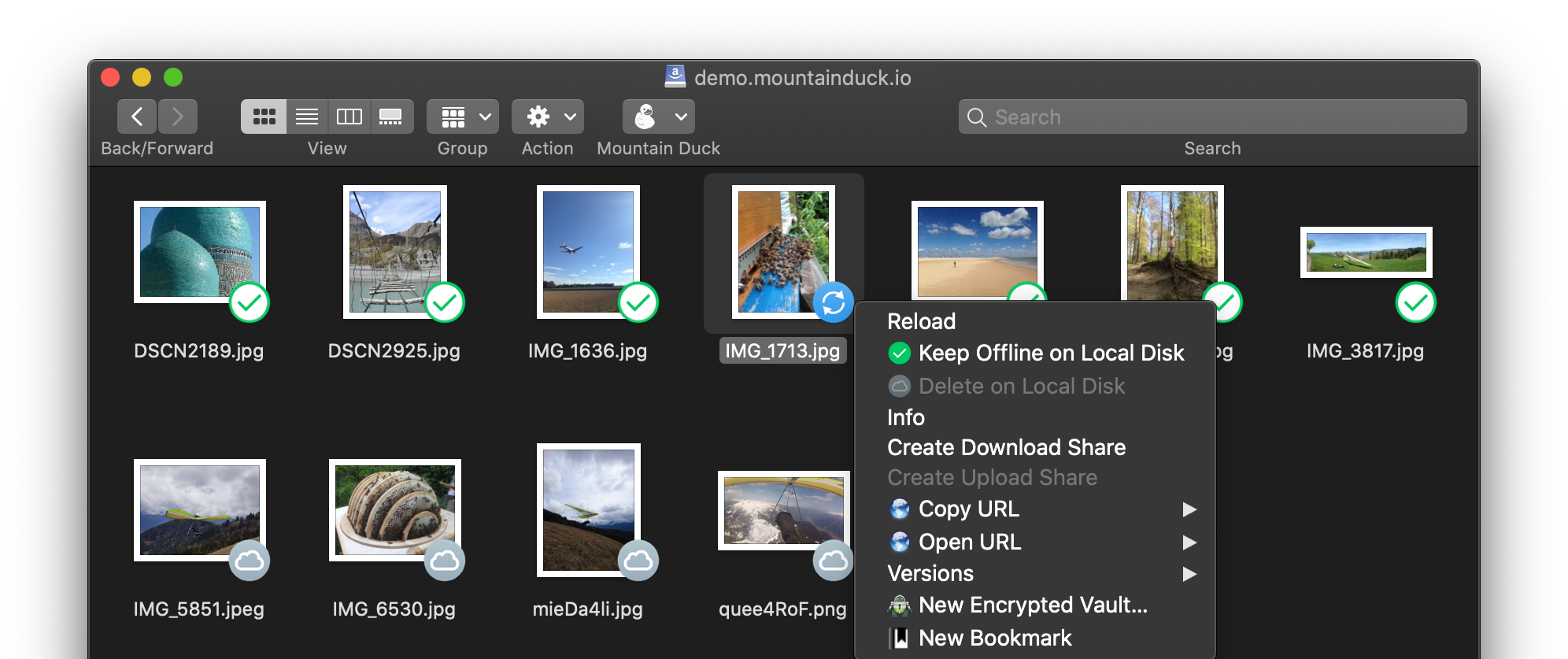
Mountain Duck mounts Aktenplatz over WebDAV as a local disk, with every remote file visible whatever its sync status.
Smart synchronisation
Files are synchronised locally when you open them, so you can work offline, and uploads run in the background. Individual folders can be kept offline permanently.
Encryption (Cryptomator)
Optional transparent client-side encryption with Cryptomator protects the data on top of everything else: encryption at rest against unauthorised access.
A proven standard client
Mountain Duck, from the makers of Cyberduck, supports WebDAV and many other protocols and specialises in reliable server connections.
Mountain Duck is a product of iterate GmbH. To the official site and the download →
Synchronise all your data with your NAS
Because Aktenplatz speaks the open WebDAV standard, NAS systems such as Synology or QNAP can reach it as well. That lets you mirror your entire Aktenplatz filing onto your own network storage automatically: a local copy in your own building, available whenever you want it, on top of the GoBD-compliant hosting in Germany.
A DMS for your NAS: compatibility by manufacturer
Aktenplatz can be connected to any NAS that has a WebDAV client or WebDAV sync. Here are the common manufacturers and the function each one uses:
| Manufacturer | Operating system | WebDAV sync function | Example model ranges |
|---|---|---|---|
| Synology | DSM | Cloud Sync (WebDAV) · File Station | DiskStation DS220+, DS224+, DS423+, DS923+, DS1522+ · RackStation RS series |
| QNAP | QTS / QuTS hero | HBS 3 Hybrid Backup Sync · HybridMount | TS-233, TS-464, TS-673A · TVS series |
| Asustor | ADM | WebDAV server and access | Drivestor, Lockerstor, AS54 series |
| TerraMaster | TOS | WebDAV client | F2-424, F4-424 · T series |
| Netgear | ReadyNAS OS | WebDAV | ReadyNAS RN series |
| Western Digital | My Cloud OS | WebDAV | My Cloud EX2/EX4, PR series |
| Buffalo | TeraStation OS | WebDAV | TeraStation TS series · LinkStation |
| UGREEN | UGOS Pro | WebDAV | NASync DXP series |
| Any NAS | Linux/Docker | WebDAV client (rclone, davfs2) | Home-built / self-hosted |
Note: the connection runs through each manufacturer's own WebDAV sync or mount function, Synology's Cloud Sync or QNAP's HBS 3 for instance. Exactly what it can do varies with the model and the firmware version; in principle any NAS with WebDAV support works. We are glad to help with the setup.
Set up in four steps
1 · Install Mountain Duck
Download Mountain Duck for Windows or macOS from mountainduck.io and install it. Administrator rights are not needed.
2 · Create the connection
Create a new bookmark of the type "WebDAV (HTTPS)" and enter the WebDAV address of your Aktenplatz account.
3 · Sign in
Sign in with your Aktenplatz credentials. Rights and visibility match your Aktenplatz account exactly.
4 · Connect the drive
One click on "Connect" and Aktenplatz appears as a drive in Explorer or the Finder, ready to work in.
You get the personal WebDAV address for your account and an illustrated step-by-step guide from us during setup, and we are happy to sit through the first connection with you.
Convenience with no compromise on security
The WebDAV drive is only one more way of reaching the same data. Everything Aktenplatz stands for stays fully in place:
- GoBD-compliant audit-proof archiving with versioning and a complete audit trail.
- Your model of roles and permissions applies through the drive as well: everyone sees only what they are allowed to see.
- Hosting exclusively in Germany; encrypted transfer.
- Optional additional client-side encryption through Mountain Duck (Cryptomator).
Common questions: Aktenplatz as a WebDAV drive
See Aktenplatz as a drive
We will show you the WebDAV connection with Mountain Duck live, on your own documents, with no obligation and no sales pressure.
Book a live demo